How to Reset Your Garage Door Keypad Without Losing Your Mind
What to Do When Your Garage Door Keypad Is Not Working
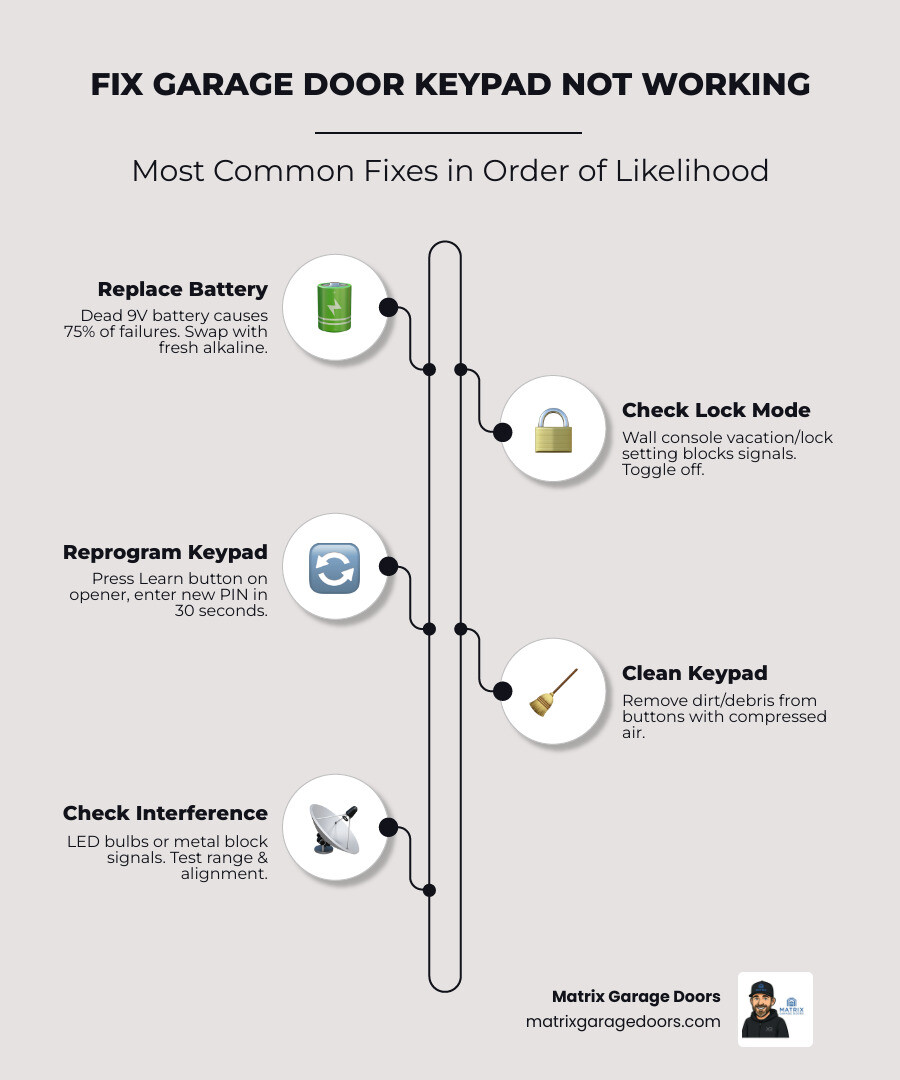
If your garage door keypad is not working, here are the most common fixes — in order of likelihood:
- Replace the battery — A dead or weak 9V battery is the cause in roughly 75% of cases.
- Check for Lock or Vacation Mode — A setting on your wall console may be blocking all wireless entry.
- Reprogram the keypad — Press the Learn button on your opener, enter a new PIN within 30 seconds.
- Clean the keypad — Dirt and debris between buttons can block contact points.
- Check for signal interference — LED bulbs inside the opener are a surprisingly common culprit.
- Inspect the wiring — On wired keypads, look for loose or frayed connections.
- Replace the keypad — If it’s over 8-10 years old and none of the above work, replacement is usually the most cost-effective move.
You punch in your code. Nothing happens. No click, no hum, no movement. Just a blank stare from a keypad that worked fine yesterday.
It’s a frustrating moment, especially when you’re standing in your driveway in the rain or rushing out the door. But here’s the good news: most keypad failures have a simple fix that takes less than 10 minutes.
In fact, with roughly two-thirds of U.S. homes having a garage or carport, this is one of the most common home access problems homeowners face — and one of the most solvable.
This guide walks you through every cause and fix, from a quick battery swap to reprogramming your opener from scratch.
I’m Andrew Hopson from Matrix Garage Doors, and our team has helped hundreds of Columbus-area homeowners diagnose and fix garage door keypad not working issues across every major brand and opener type. We’ll cover everything you need to get back inside fast.
Simple garage door keypad not working glossary:
Common Reasons Your Garage Door Keypad is Not Working
When we get a call in Canal Winchester or Dublin about a garage door keypad not working, we usually start with a “process of elimination.” Modern garage door systems are surprisingly robust, but they live in a harsh environment. Your keypad is exposed to Ohio’s humidity, freezing winters, and direct sunlight, all of which take a toll on the electronics.
The most common reasons for failure include:
- Dead Batteries: This is the “is it plugged in?” of the garage door world. Even if the keypad lights up, the battery might not have enough juice to transmit a signal to the motor.
- Stuck or Worn Buttons: Over time, the rubber membrane can degrade, or dirt can get lodged behind the keys, preventing a complete circuit.
- Signal Interference: Since about 58% of garage door openers are now equipped with wireless connectivity, the “airwaves” in your garage are more crowded than ever.
- Lost Programming: Power surges or even a long-dead battery can cause the opener to “forget” your keypad’s unique code.
Comparing Wireless vs. Wired Keypad Issues
| Symptom | Wireless Keypad | Wired Keypad |
|---|---|---|
| No Backlight | Dead battery or internal failure | Power surge or loose wire |
| Works Intermittently | Signal interference or low battery | Frayed wire or loose terminal |
| Keypad Lights Up, No Movement | Reprogramming needed or interference | Faulty control board |
| Buttons Feel “Mushy” | Worn rubber membrane | Physical damage/age |
Cleaning a Dirty or Sticky Garage Door Keypad Not Working
If you find yourself mashing the buttons just to get a response, you likely have a dirt problem. Dust, pollen, and even insect webbing can accumulate behind the keys.
To clean it, start by removing the battery. Use a can of compressed air to blow out any debris from the gaps between the buttons. For stubborn grime, apply a few drops of a mild appliance cleaner or isopropyl alcohol to a soft, lint-free cloth. Never spray liquid directly onto the keypad, as it can seep into the circuit board. Wipe down the keys and the spaces between them. If your keypad has a removable front cover, take it off to reach the contact points more effectively.
Troubleshooting a Garage Door Keypad Not Working Due to Lockout Mode
Sometimes, the keypad is perfectly fine, but the “brain” of the system has been told to ignore it. This often happens due to Vacation Mode or Lock Mode on your interior wall console.
If you’ve been cleaning the wall station or if a child was playing with the buttons, you might have accidentally engaged the lock. When this mode is on, the wall button will still work, but all remotes and keypads are disabled for security. Look for a flashing light on your wall control. To fix this, simply press and hold the “Lock” button for a few seconds until the light stops flashing or turns off.
Additionally, some modern keypads will trigger a temporary security lockout if an incorrect PIN is entered too many times. If this happens, you may need to wait 10–15 minutes or perform a full system reboot by unplugging the opener motor for one minute.
Step-by-Step Battery Replacement and Maintenance
If your garage door keypad is not working, the battery is the first thing we check. Most keypads use a standard 9-volt alkaline battery, though some newer models use AA or even coin-cell lithium batteries.
The Matrix Battery Guide
For our neighbors in Hilliard or Westerville, we always recommend using lithium batteries for outdoor keypads. Why? Because standard alkaline batteries can lose up to 50-80% of their performance when temperatures drop below freezing. Lithium batteries can handle Ohio winters down to -40°F without breaking a sweat.
When replacing the battery:
- Slide or screw off the battery cover.
- Pop out the old battery and check the metal terminals for corrosion (white or green crusty buildup).
- If you see corrosion, clean it off with a pencil eraser or a cotton swab dipped in rubbing alcohol.
- Apply a tiny bit of dielectric grease to the terminals to prevent future moisture damage.
- Snap in the new battery and test.
For more details on specific sizes, check out The Ultimate Guide To Garage Door Remote Battery Sizes.
Resetting and Reprogramming Your Access Code
If a new battery doesn’t do the trick, your keypad and opener may have lost their “handshake.” This is common after power outages or if the unit is quite old.
The 30-Second Rule
Most major brands like LiftMaster, Genie, and Chamberlain use a Learn Button system.
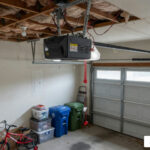
- Locate the Learn button on the motor unit (you’ll likely need a ladder). It’s often hidden under a light cover.
- Press and release the Learn button. An indicator light will start glowing or blinking.
- You now have a 30-second window to get to your keypad.
- Enter your desired 4-digit PIN and press the “Enter” or “Start” button.
- The opener lights will usually flash, or you’ll hear two clicks, confirming the code is set.
If you’re dealing with a persistent failure to sync, you may need more intensive Garage Door Repairs to address a faulty receiver board. Modern systems use rolling code technology, which changes the signal every time you use it. If the “rolling” sequence gets out of sync, a full memory clearance (holding the Learn button for 6 seconds) and reprogramming all remotes and keypads is the only way to reset the system.
Solving Signal Interference and Hardware Issues
Is your keypad only working when you stand inches away from the door? Or maybe it works at noon but fails at 6:00 PM? You’re likely dealing with signal interference.
The LED Bulb Culprit
One of the weirdest “secrets” in the industry is that LED light bulbs can cause a garage door keypad not working issue. Many LED bulbs emit radio frequency (RF) interference that “drowns out” the signal from your keypad. If you recently changed the bulbs in your opener motor, try removing them and testing the keypad. If it works, you need to buy “garage door compatible” LED bulbs that are shielded against RF interference.
Other Hardware Checks:
- Antenna Alignment: Ensure the small purple, yellow, or grey wire hanging from the motor unit is hanging straight down and isn’t tucked inside the metal housing.
- Metal Obstructions: If you’ve recently added metal shelving or a new refrigerator near the garage door, it could be blocking the signal.
- Frayed Wiring: For wired keypads, inspect the low-voltage wires for staples that were driven too deep, rodent chews, or loose connections at the back of the keypad.
When to Repair vs. Replace Your Keypad
Most garage door keypads have a lifespan of 8-12 years. If your unit is approaching a decade of service and is acting up, we usually recommend a replacement.
A new universal keypad typically costs between $30 and $60, which is often cheaper than a professional diagnostic visit for an old, failing unit. You should definitely Upgrade Your Access With A Replacement Garage Keypad Or Remote if you notice:
- Cracked Housing: This allows moisture to reach the circuit board.
- Water Intrusion: If you see condensation behind the screen or buttons.
- Inconsistent Response: If the keypad works only 50% of the time despite new batteries and reprogramming.
Frequently Asked Questions about Keypad Troubleshooting
How long do garage door keypad batteries typically last?
In a climate like Columbus, OH, you can expect a battery to last 12-24 months. High-traffic households where the door is opened 10+ times a day will see shorter lifespans. We recommend a preventative replacement every autumn to ensure you aren’t locked out during a winter storm.
Can cold weather cause my keypad to stop responding?
Absolutely. Cold weather affects the chemical reaction inside alkaline batteries, reducing their voltage. It also makes the rubber buttons less elastic, meaning you have to press harder to make contact. Switching to a lithium 9V battery is the best way to combat “winter keypad syndrome.”
Why does my keypad light up but the door won’t move?
This usually indicates one of three things:
- Weak Signal: The battery has enough power to light the LEDs but not enough to transmit the RF signal.
- Lock Mode: Your wall console has disabled wireless entry.
- Safety Sensor Obstruction: If the door starts to move and then reverses, your photo-eye sensors are likely misaligned or blocked.
Conclusion
A garage door keypad not working is a major inconvenience, but it doesn’t have to ruin your day. By following this systematic approach—checking the battery, clearing the “Lock” mode, and cleaning the contacts—you can solve the vast majority of issues yourself.
However, if you’ve tried these steps and your door still won’t budge, it might be time for a professional look. At Matrix Garage Doors, we are a family-owned company serving the entire Columbus, OH region, from Powell and Dublin to Pickerington and Grove City. With two decades of experience, we provide 24/7 emergency service to ensure your home remains secure and accessible.
Whether you need a simple reprogram or a full system upgrade, we’re here to help. Schedule your professional garage door opener installation today and let us take the stress out of your garage door maintenance!